MRN Number - What It Is and How to Check the Status of a Customs Declaration

The MRN (Movement Reference Number) is a unique, 18-character reference number that the customs system assigns to every accepted customs declaration in the European Union: export, import and transit. The MRN lets the customs office, the carrier and the business identify a specific operation, and for export and transit its current status can be checked in the EU’s MRN Follow-up tool. The number appears on the documents accompanying the consignment, usually together with a barcode. Below we explain how an MRN is structured, where to find it and how to track the customs status of goods.
What an MRN number is
An MRN is created when the customs system accepts a declaration, i.e. when it is registered. It is a unique identifier, more precisely a unique number with international reach, which accompanies the goods throughout the procedure, from the assignment of the number at the office of departure or entry until the procedure ends. All the messages exchanged between the declarant, customs offices and the customs services of different countries refer to this number.
In practice, an MRN appears in three types of operation:
- Export the number is assigned by the export system (in the EU called ECS, and in its newer version AES) once the export declaration is accepted.
- Transit the number is assigned by the NCTS system when the transit procedure is opened, for example when goods travel from the port to an inland customs office.
- Import a number is given to the declaration for release for free circulation and other import procedures, and separate numbers are also given to declarations linked to import, for example temporary storage of goods after unloading.
How an MRN is structured
An MRN always has 18 characters. At first glance it is a string of digits and letters, but each part has a meaning.
| Position | Meaning | Example |
|---|---|---|
| 1-2 | last two digits of the year the declaration was accepted | 26 |
| 3-4 | code of the country where the declaration was accepted | PL |
| 5-17 | unique code assigned by the national system, in newer systems including an indicator of the type of procedure | a string of letters and digits |
| 18 | check digit | a single digit |
Swipe the table sideways to see all columns.
The exact layout of characters 5-17 depends on the system and the version of the rules. From a practical point of view two things matter: the first four characters immediately show the year and the country, and the check digit means the system will usually catch a typo straight away.
Where to find the MRN
The declarant, most often a customs agency acting on behalf of a business, receives the MRN in the response message from the system after the declaration is accepted. The number also appears on the documents that travel with the goods:
- Export Accompanying Document for export, with the MRN and a barcode that the office of exit scans when the goods leave the EU.
- Transit Accompanying Document (TAD) for transit, presented at the office of destination to close the procedure.
- System message electronic confirmation that the declaration has been accepted, which the agency passes on to the client together with the number.
If the carrier asks for the MRN and the shipper does not have it, contact the agency that lodged the declaration. Without the number, the driver will not get through the formalities at the office of exit.
How to check MRN status
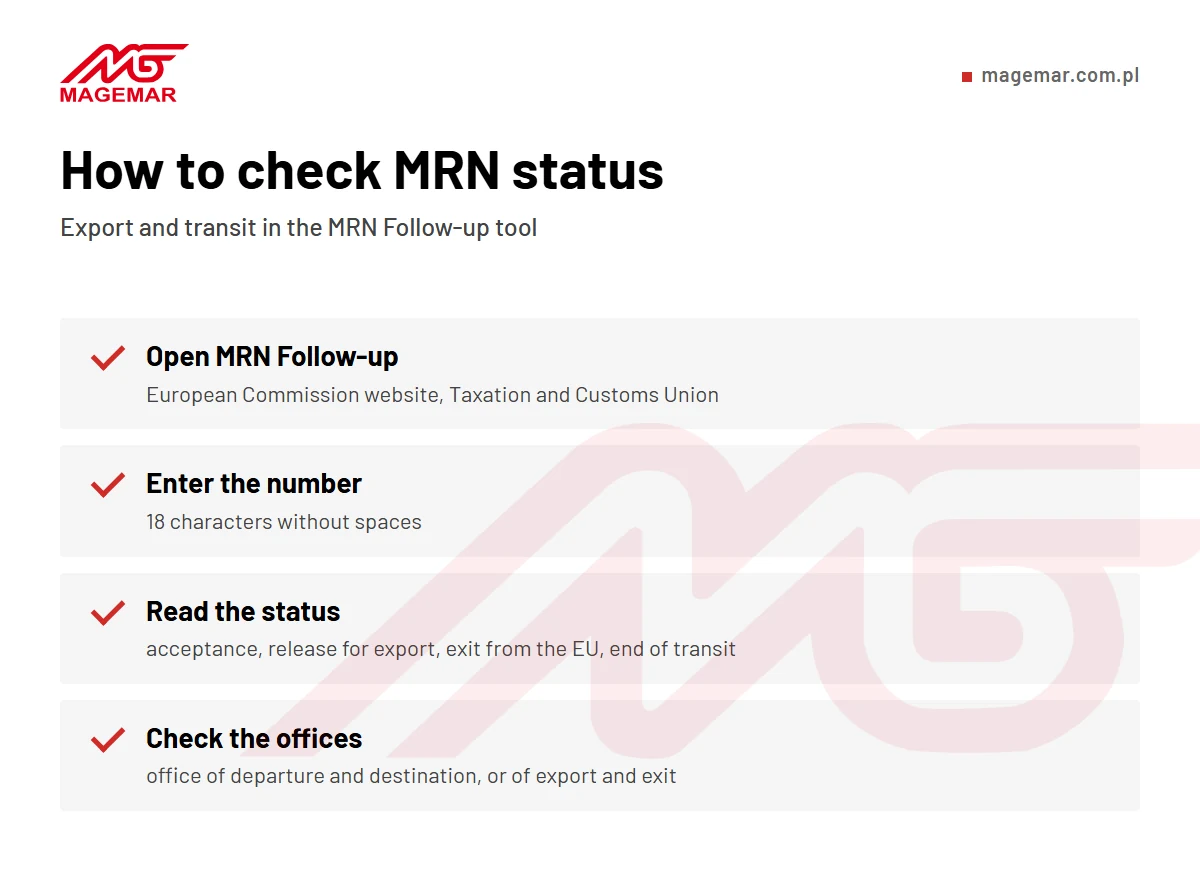
The status of export and transit can be tracked in the EU’s MRN Follow-up tool, available free of charge on the European Commission website. Just enter the number and the system shows the stage the procedure is at. The data comes from the national customs systems, so it updates with a slight delay, but in practice almost in real time.
- Open MRN Follow-up search for “MRN Follow-up” on the European Commission website (Taxation and Customs Union).
- Enter the number type in the 18-character MRN without spaces and choose a language.
- Read the status the system shows the current customs status, for example acceptance of the declaration, release for export, exit from the EU or end of transit.
- Check the offices for transit you can see the office of departure and destination, and for export the office of export and exit.
A few terms in the tool are worth knowing. ECS (Export Control System) is the export system, and transit is handled by NCTS (New Computerised Transit System). The office of exit is where the goods leave the EU, the office of destination is where transit ends, and exit confirmation means confirmation that the goods have been exported. For exports you will also see the abbreviation EAD (Export Accompanying Document). The data in the tool is supplied by the national customs administrations of each country, which process the declarations and supervise the procedures.
MRN Follow-up does not show the status of import declarations. The progress of import clearance is checked in the national system or with the customs agency, which has access to the messages.
MRN in export - why the status matters so much
When goods are exported outside the EU, the MRN matters not only for customs but also for tax. After the goods have left, the office of export sends an electronic exit confirmation, known in Poland as the IE-599 message. This is the document on the basis of which the exporter can apply the 0% VAT rate. If the status gets stuck and the confirmation does not arrive, after the deadline the exporter has to prove the export with other evidence or account for VAT at the domestic rate.
This is why it is worth checking the MRN status a few days after the goods leave, especially when the shipment exits the EU through a port or border crossing in another country. The most common causes of problems are goods leaving through a different office from the one declared and a driver who did not present the document at the office of exit.
MRN in transit
In the transit procedure, the MRN links the office of departure with the office of destination. The goods travel under customs supervision, for example from the port of Szczecin to an inland office where they will be cleared. The procedure must be closed within the set time limit, and until then the guarantee lodged by the declarant remains blocked. Tracking the status in NCTS makes it possible to spot a transit that has not been closed before the customs office opens proceedings.
Customs declarations and status checks in Szczecin
Our customs agency lodges export, import and transit declarations, passes MRNs on to clients and keeps track of the status until the procedure is completed. For exports we check that the exit confirmation needed for VAT has arrived. We combine the formalities with sea transport and port forwarding. If the goods are to wait longer for clearance, see how a customs warehouse works.
Contact us if you need a customs declaration or have an MRN whose status is not changing. We will check the procedure and advise on the next steps.
Frequently asked questions
What is an MRN?
The Movement Reference Number, an 18-character number that the customs system assigns to every accepted declaration in the EU.
How many characters does an MRN have?
Eighteen. It starts with two digits of the year and a two-letter country code and ends with a check digit.
How do I check MRN status?
Enter the number in the MRN Follow-up tool on the European Commission website. It works for export and transit.
Who assigns the MRN?
The customs system of the country where the declaration was accepted. The declarant receives the number in the response message.
What should I do if the export status does not change?
Contact the customs agency that lodged the declaration. It will check whether the goods passed the office of exit and help obtain the exit confirmation.